
Cruze |
||||||||
|
|
|
|||||||
Warning: Refer to Brake Dust Warning in the Preface section.
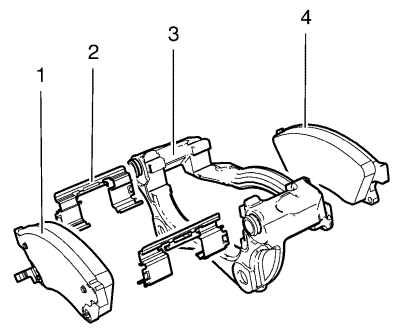
| 7.1. | Install a large C-clamp over the top of the calliper housing and against the back of the outboard pad (1). |
| 7.2. | Slowly tighten the C-clamp until the pistons are pushed completely into the calliper bores. |
| 7.3. | Remove the C-clamp from the calliper. |
| • | Missing mounting hardware. |
| • | Excessive corrosion. |
| • | Bent pad retainer spring (2). |
| • | Looseness at the brake calliper mounting bracket (3). |
| • | Looseness at the disc brake pads (1, 4). |
| • | Excessive contaminants in the brake caliper mounting bracket (3) surface and threads. |
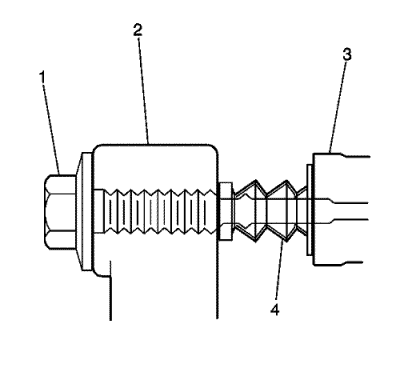
| • | Binding |
| • | Seizing |
| • | Looseness in the brake calliper mounting bracket (3). |
| • | Bent or damaged brake calliper mounting bolts (1). |
| • | Cracked or torn boots (4). |
| • | Missing boots. |
| • | Bent or damaged brake calliper mounting bracket (3). |
| • | Cracked or damaged brake caliper (2). |
| © Copyright Chevrolet. All rights reserved |


